Are you looking for the best ways on how to destroy a hard drive filled with classified information? Keep in mind that data theft is a major source of concern for most private consumers and large corporations, you need to wipe your hard drives clean so the data stored never sees the light of day.
You’re in luck. We’re talking you through the best options to consider to protect your data once you’ve degaussed your hard drive.
Why should you destroy old hard drive?

Data safety
As time passes old hard drives end up becoming a liability in the world of data security. Most often electronic data can be compromised when the device where the data is secured becomes unusable or worse, compromised. With that being said, a single device has the potential to store over thousand classified files and data. However, just by deleting files from the particular device isn’t suffice to permanently get rid of the data. What you need is an adequate software and tools to fight criminals bent on extracting pertinent information and exposing your business.
Customer trust
To gain your customers trust is several years in the making and all of that can vanish into thin air if you continue to put your data security at risk. Make sure your old hard drives are securely backed up and destroyed by professionals.
Legal regulations
In case you’re unaware, data breach has some serious consequences which include hefty fines and possibly even criminal prosecution in extreme cases. Failing to protect your consumer’s private information is not something that should be taken lightly. When you destroy old hard drive it’s because you’re business has signed up with the necessary compliances towards privacy regulations.
Brand reputation
Stolen data violates your brand’s reputation and puts you in the middle of a ton on legal and financial problems. From what we’ve seen many corporate brands never end up recovering from severe data breaches due to the grueling costs and tainted brand reputation.
Don’t let excuses get in the way of protecting your information. Destroying your old hard drives makes a lot of sense!
Environmentally secure hard drive destruction
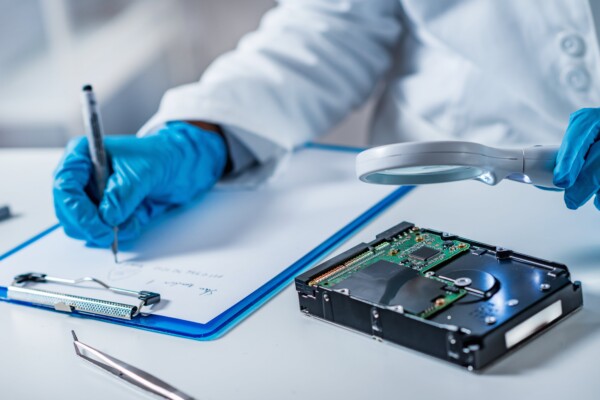
Hard drive and electronic waste disposal should be regulated by law to comply with EPA hazardous waste requirements, meaning it is illegal to put electronic waste in your normal trash.
Computer IT Disposals shreds hard drives and other electronic media devices in the Bristol area. We are service providers that recycle raw materials after shredding your electronic materials.
How to destroy a hard drive – The proper steps
- Start by removing it from your device. In the case of laptops, you might want to take off the casing or perhaps unscrew a few screws to get there.
- Then you need to get your hand on the metal platter inside.
- Try to power up your hard drive by plugging it in so it gets charged up. This causes the metal platter to spin.
- While it is spinning, take a screwdriver and mercilessly scratch the metal platter as it continues to spin.
- Now that is a scratched up masterpiece, take a hammer and “hulk smash” it into little pieces.
If you want a more detailed visual of hard drive shredding, then keep reading below for the useful steps you need to undertake:
How to destroy a hard drive – The “correct” methods
Brute force
This has to be one of the quickest methods to destroy the metal platter in a hard drive by bashing it with a hammer. Since platters have a framework that is made up of ceramic or glass, it easily shatters. Many others are built with metals, but a heavy hammered hand can obliterate it. We don’t want to claim that this is the most secure hard drive destruction route, but it sure takes the edge out of any pent up anger you might be harboring inside!
Hard drive shredders
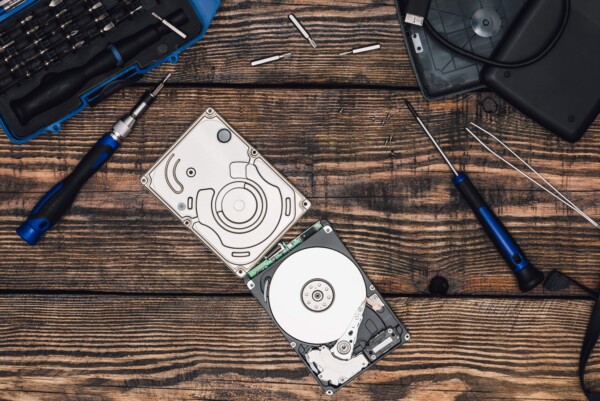
Try crushing or bending a hard drive till it completely renders. Yes, it is as fun as it sounds. Most hard drive crushing systems exert over 3 tones of pressure and are able to destruct 500 laptop hard drives by the hour. In just a few seconds you’re well on your way you sherd your hard drive into a million pieced and this way is 100% safe with no no risk of parts flying out and potentially poking your eyeball. Hard drive crushers are adaptable and can be used at home or in office, and according to us this is the best hard drive shredding process.
Overwriting
Windows and Mac OS X software have overwrite utilities that can help you protect data. The downside is that, it could leave ‘ghost’ traces, which other programs or experts can still retrieve. Should your hard drive be included in litigation, overwritten files do not sit well with the jury, even if no one can read the files there anymore. That’s because it just makes you look guilty – even if you’re not.
How to destroy a hard drive – The “incorrect” methods
Dipping it in water (or acid)
You could drop your hard drive into a container of battery acid or something equally strong in strength and watch it dissolve. Although, you still need to work out how to get rid of the acid once you’re done, because who wants a bucket full of acid just lying around at home or the office. It’s not pleasant, but highly successful.
Heat/fire
Yes, melt your metal platters in your hard drives like you would cheese in a grilled sandwich. Either you want to burn your hard drive straight over the fire or with a blow torch, just be patient. Just know that you can’t sufficiently destroy your hard drive with a normal fire. Be aware, as you melt your hard drive you’re exposing yourself to harmful toxins and fumes that can severely damage your health. You need to be mindful of the risk you’re putting yourself and others around you. Just be careful!
What are the common risks of not wiping your hard drive?
It may seem all too simple: you want to permanently get rid of your old hard drive and sensitive data with it, after all what go possibly go wrong.
Well, actually quite a bit. Security experts know that just wiping data isn’t really going to erase all the data on your hard drive in a way that it’s irretrievable. Although, there are many methods out there, choose those that support your business needs.
Globally cybercrime will cost businesses more than $6 trillion by next year, and most of the damage is a result of human errors rather than big time data breaches. Disposing of your old business hard drives incorrectly may put you deep into the web of problems.
So, go through thorough data destruction options to make sure you achieve what you set out to do. In fact, without the proper equipment, even personal attempts at data destruction can be unsatisfactory.
That’s where we come in. CITD offers hard drive destruction equipment to businesses of all sizes. With technology meets most standards and ensures once destroyed, your data cannot be retrieved .
How to destroy a hard drive — Final Thoughts
Hard drive is scattered on your floor into itsy bitsy pieces. Your house doesn’t smell like battery acid. And, you’ve taken out all your pent up frustration. That means our job is done here. We’ll leave you with this last key takeaways:
- Do not, and we repeat DO NOT let your hard hard drive get into the wrong hands. It’s likely that it contains senstive information that can be damaging if released.
- Properly destroying a hard drive can help your organization or business meet the compliance regulations in the UK.
Though, we may not have gone over all the possible methods on how to destroy your hard drive., the mentioned solutions in this blog are definitely practical and feasible.